How to swap the people in any video with Higgsfield Genjutsu
Genjutsu keeps every move, cut and camera angle of a video you already have and rebuilds the people doing it from a few photos. Here’s exactly how I made the Bryan Johnson × Andrew Huberman clip: the clip rules, the photos, the prompt, what it cost, and the runs that failed first.
- for the full clip
- $6.36
- of video, 480p
- 20s
- submit to download
- ~50 min
The short version
- Go to Higgsfield and get an API key at console.higgsfield.ai.
- Load about $10 into the API. API credits are separate from a Higgsfield app subscription. One 20-second video costs around $6.
- Grab the prompt from the agent section below.
- Pick two photos of the people you want in it. One clear, front-facing photo each.
- Paste in the link to the video you want to copy. The one I used is here.
- Hand it all to Claude or Codex and wait. Mine took about 50 minutes.
A quick mental model
You hand Genjutsu three things. The video is the choreography, the photos are the cast, and the prompt says who plays whom.
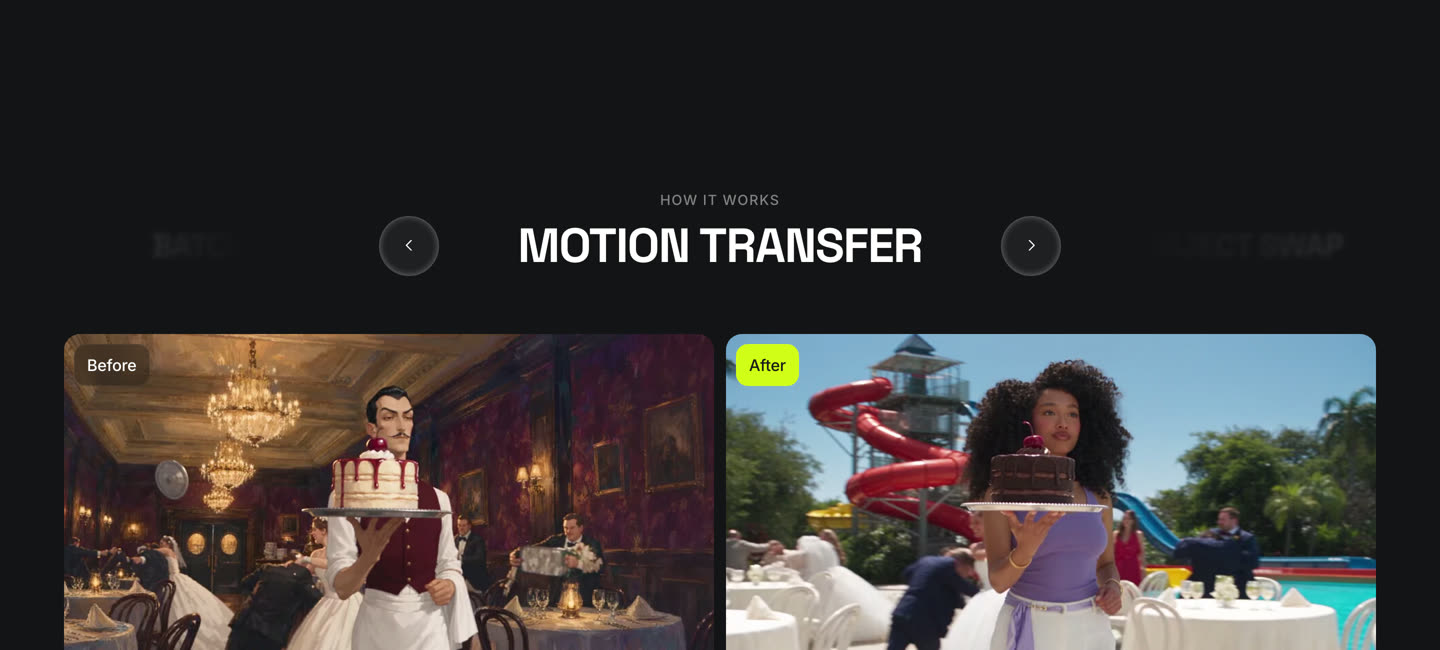
It copies the motion, timing and camera from the video almost frame for frame, and rebuilds faces, hair, clothes and build from the photos. The set stays unless you ask for a new one. You don’t need code for this: it’s in the Higgsfield web app at higgsfield.ai/genjutsu. The API is only worth it if you want to run it from a script.

Pick the clip first
Everything downstream inherits the source: its moves, its framing, its cuts. A weak original can’t be fixed later. What worked for me was a two-person performance on a plain set, both people facing the camera, only a couple of cuts.
- At least 5 seconds. The stated minimum is 4. Every one of my exactly-4-second clips processed for about three minutes and then failed. 5 and 6 worked every time.
- 30 seconds max. Anything longer gets trimmed to 30.
- You pay per second of source, so trim to the part you actually want.
# grab the source (any yt-dlp site works)
yt-dlp -f "bv*[vcodec^=avc1][height<=1080]+ba[ext=m4a]" \
  --merge-output-format mp4 -o source.mp4 "https://www.youtube.com/watch?v=x9yop0nYR9g"

# cut the section you want. 5-30 seconds. -ss is the start, -t the length
ffmpeg -ss 13.4 -i source.mp4 -t 20 -c:v libx264 -crf 16 \
-c:a aac -movflags +faststart clip.mp4One good photo per person
My first test used two photos of myself: one in ski goggles, one in sunglasses, small in the frame. It came back as two guys who looked nothing like me or like each other. The photos were the problem, not the model.
- Face big and clear, nothing covering it. No sunglasses, no hats, no hands near the face.
- Sharp, at least ~1000px tall. My 400px photos gave mushy faces.
- Full body if you can find one. A chest-up photo leaves the model guessing the build.
- The outfit in the photo is the outfit in the video. Ski jacket in, ski jacket out.
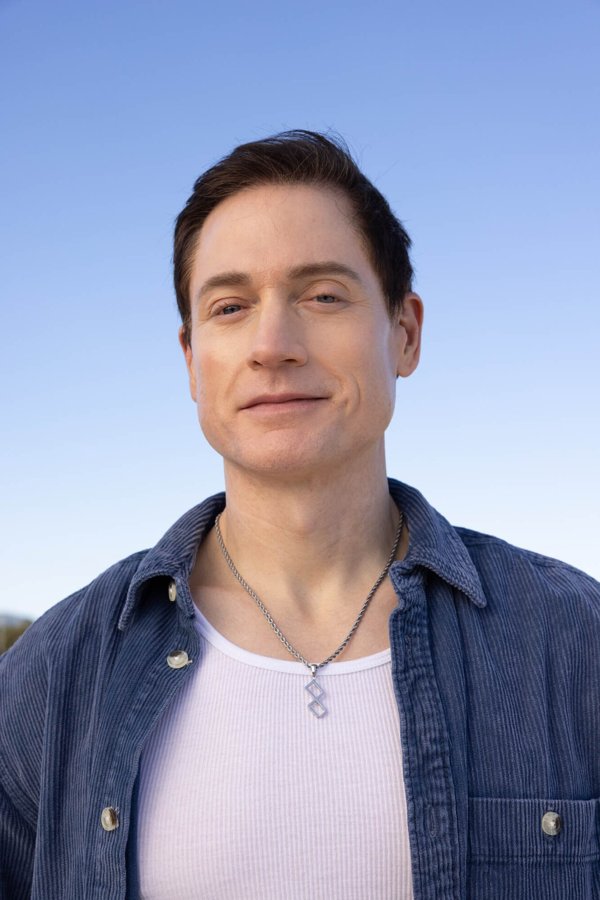
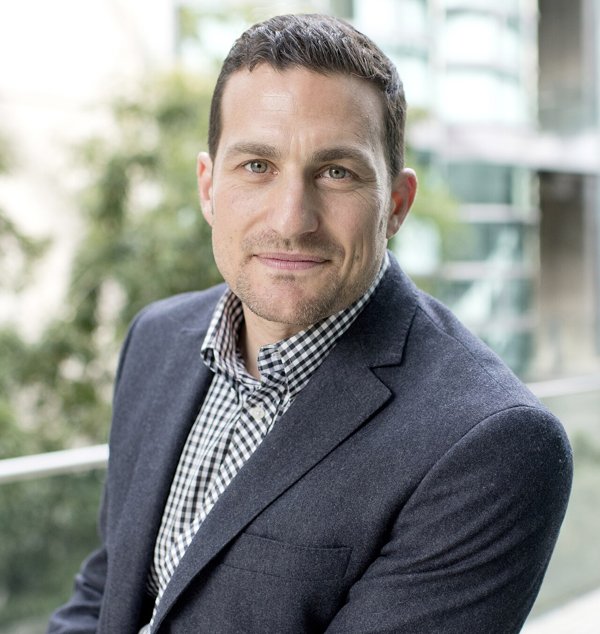
For public figures, Wikimedia Commons has sharp, properly licensed portraits. That’s where both of mine came from.
Say who plays whom, and lead with the fix
Assign each photo by position (“the man on the left becomes the man in image 1”) and describe what matters: hair, build, clothes. Two things I learned the hard way:
- Put the negatives first. The original performers wore sunglasses. “No glasses” at the end of the prompt got ignored. Moved to the first line, it worked.
- Describe the build in comparison. “Stocky” alone did little. “Noticeably heavier-set than the man on the left” did more.
Neither man wears glasses or sunglasses; both faces are fully uncovered.
The man on the left becomes the man in image 1: his face, no glasses, short dark
swept-back hair, clean-shaven, lean build, blue corduroy overshirt open over a white
ribbed tank top, thin silver chain necklace.
The man on the right becomes the man in image 2: his face, no glasses, short dark
hair, light stubble, stocky, broad-shouldered, muscular build with a thick neck and
full chest, noticeably heavier-set than the man on the left, charcoal blazer over a
black-and-white gingham shirt.
Keep the motion, hand gestures, timing, camera, orange set and microphone unchanged.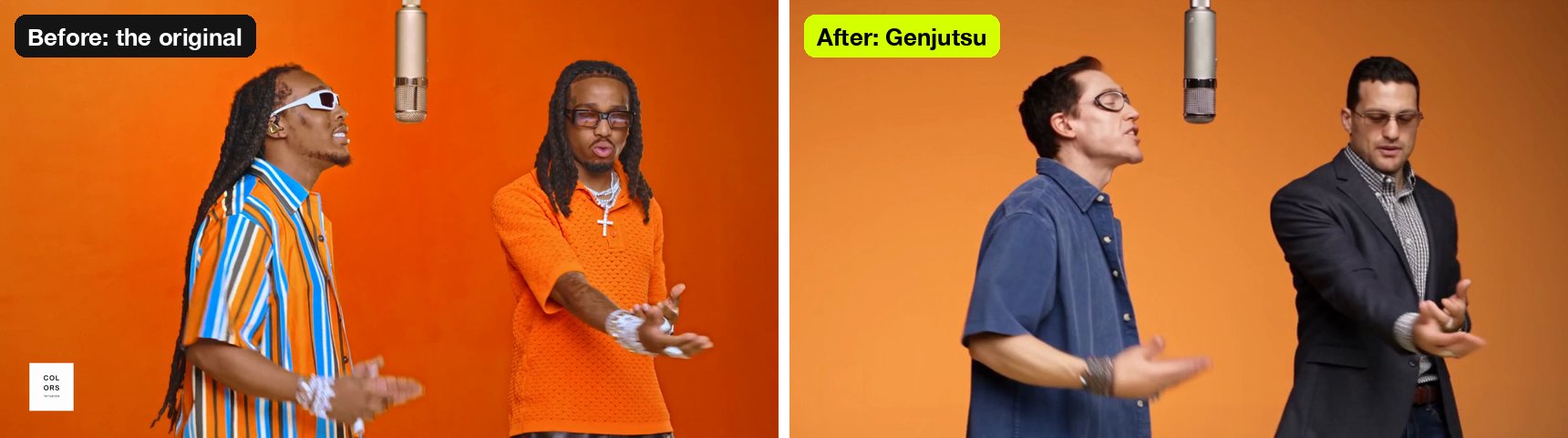
Test 5 seconds at 480p first
Price is per second of source video, rounded up: $0.318 at 480p, $0.681 at 720p. A 5-second test at 480p is $1.59. That buys you the only judgement that matters, whether the recast works at all, before you spend on the full clip.

Then run the whole thing, and wait
The full 20 seconds at 480p was $6.36. It took about 50 minutes: roughly 24 in the queue, the rest rendering. Start it and walk away. Download the result straight away, because outputs are only kept for about a week.
I stayed at 480p. Posted as a Reel with black bars, you can’t tell.
Post it
- Keep the original audio. The mouths are synced to it. Swap in a different sound and the lip-sync falls apart, which is the whole effect.
- Letterbox it. A landscape two-shot doesn’t crop to vertical without cutting someone in half. Center the 16:9 clip in a 9:16 frame and use the black bars for your text.
- Turn on the AI label. It’s a realistic video of real, recognizable people. Instagram and TikTok both require it.
Let an agent run it
Paste this at Claude Code or Codex. It carries the API details, the 5-second rule and the long wait, and it won’t spend anything until you say go.
Build me a small script that runs Higgsfield Genjutsu motion transfer through their API.

1. Read HF_API_KEY_ID and HF_API_KEY_SECRET from my .env (keys come from console.higgsfield.ai). Auth header: "Authorization: Key <id>:<secret>". Never print them.
2. Take a local source video and 1-8 local reference images as arguments. Upload each one: POST https://api.higgsfield.ai/files/generate-upload-url with {"content_type": "video/mp4" or "image/jpeg"}, then PUT the file to the returned upload_url with every header in upload_headers (do NOT send my API key to that URL), and use the returned public_url.
3. Refuse a source video under 5 seconds. The API minimum is 4, but clips at exactly 4 seconds fail after several minutes of processing.
4. Add an --estimate flag that POSTs the same body to https://api.higgsfield.ai/estimate/higgsfiled/genjutsu/motion-transfer/v1.0 and prints the price without generating anything.
5. Otherwise POST {"video_url", "image_urls", "prompt", "resolution": "480p"} to https://api.higgsfield.ai/higgsfiled/genjutsu/motion-transfer/v1.0. The slug really is spelled "higgsfiled" — do not correct it.
6. Poll the returned status_url with backoff (start at 2s, cap at 10s). Stop on completed, failed, nsfw or canceled. Allow at least an hour — a 20 second clip took 50 minutes for me, most of it in the queue.
7. On completed, download video.url to disk. Outputs are only kept for about 7 days.
8. Run nothing on its own. Show me the estimate and wait for me to say go before any paid generation.
The honest part
Very famous faces get blocked. My first idea was Bill Gates and Jeff Bezos. Bezos was blocked every time, alone or paired. Gates got through exactly once, and only because the result didn’t actually look like Gates. When I tightened the prompt and the face got closer, that got blocked too. The filter checks the finished video, not just the photos you upload. Blocked runs are free, but no prompt trick is going to get you a perfect billionaire.
Longer clips drift. My 5-second test had no glasses on either man. Over the full 20 seconds they crept back for most of the clip, same prompt. If a detail matters, check the long version frame by frame before you post.
What it all cost: about $13 across the runs that went through: two early tests, two 5-second tests and the 20-second final. Six other runs failed or were blocked and cost nothing.
More field guides
All guides → Jev · GuideHow to set up Jev and make your first API call →Step by step, about 5 minutes
 Jev · GuideHow to automate SEO internal linking with Jev →The script, the prompt and the threshold rule
 Jev · GuideHow to find sales prospects ready to buy with Jev →Two scripts and the three filtering questions
 Jev · Directory130+ Jev demos, repos and docs by team →Everything worth watching or running